Not too much tweaking the last couple of weeks - I've mainly been focusing on using the lill guy. Typing on the small keyboard goes better and better, even if the touchpad is giving me trouble - it's right under where my thumbs hoover, so sometimes I'll touch it, send the cursor to a completly different part of the screen and not notice until a sentence later...
One thing I have done is to install KompoZer, so I can make websites on my Eee if the urge overtakes me. I've even worked out roughtly how large the 'usable' part of the screen is for a webpage (760 x 340 if anyone is interested - the rest will be taken up by menues and scrollbars). So if I can come up with something thats worth putting online, and I can work out how to use KompoZer, I can make the site on the Eee...
The intersting thing is how I installed it thought... my first brush with apt-get. Worked perfectly, and all I had to do afterwards was to use the Launcher Tools to put an icon on the Easy mode Desktop.
Yupp, got to love my powerfull lill Eee.
Sunday, June 15

Thursday, May 29
Tweeeaks
My little Eee is running the stock OS it came with - a customised Xandros with a tabbed front end. A nice little 'simulation' of it can be found at honeypothack. However, that's not quite what I see when I power the little guy up; my Eee is tweaked. Or was that tweeeaked? Or possible tweakeeed?
Thanks to the Absolute Beginers guide at eeeuser.com, it's easy even for a noob like me.

Thanks to the Absolute Beginers guide at eeeuser.com, it's easy even for a noob like me.
A quick list of what I have done:
Added repositories
Used pimpmyeee.sh
Added some third party tools
Namely pimpmyeee.sh, Launcher Tools, Theeemer, EmEditor and Tweakeee
Placed icons for said tools in a separate sub-tab
It's easy using the Launcher Tools
Enabled the Start button
Takes two mouseclicks with Tweakeee
Changed the default console
Tweakeee again - one click
Disabled the popup that tells me the Eee has found an SD card on boot
Not hard at all, following the howto. Using the console, I turned the script that runs to inform me that my Eee has found a SD card or USB stick non-executable.
Removed some of the useless (to me) buttons from the lower right
Tweakeee once again. So simple even grandma could do it.
Changed the default background images
Theeemer was used for this. Quick and easy.
Added dictionaries to Open Office
There is a macro in OO itself that lets you do this with ease.
Installed VLC
Tweakeee. I sense a pattern forming...
Made it shut down when I close the lid
Tweakeee, but with a minor twist this time. Tweakeee will - if you ask it to - place an icon on your desktop to let you change what happens when you close the lid.
Installed the GIMP on a whim
Because I could, and Tweakeee offers a button to push to do it!
Placed a shortcut (icon) to the characther map on my work tab so I could have an easy way t get norwegian letters when I need them
This one I actually had to research... for all of five minutes. The character map under Xandros is named 'kcharselect', and once I had learned that it was a simple thing to use the Launcher Tools to place an icon on the right tab.
Placed a shortcut to Open Office Base on my worktab (not that I am a big user of databases, but I can see a use for it in the future)
Again, easy with the Launcher Tools once you know that the name of the executable is 'oobase'.
While a fair number of these tweaks are 'under the hood', my Eee looks quite different when I boot it...Friday, May 16
Whoops
I was going to talk briefly about my tweaks. However, I will instead talk of the joys of restoring to a virgin system...
Yes, I did mess someting up, trying to enable the advanced desktop (ie: the Windows lookalike). Most probably I made a mistake in the file startsimple.sh (as far as I understand - which isn't very - a sh-file is more or less like a bat-file in old MS-DOS), renderign my lill guy unable to finish the boot-up.
No worries - or so I thought. Just hit F9 during boot up and restore it to factory default!
Uhm. No. Could not get F9 to work.
Tried tapping. No joy.
Tried holding. No joy.
Tried swearing in multiple languages. That didn't work either, but it made me feel better.
Put my lill Eee in it's sleeve, dug up the DVD it comes with, brought both to work. Ten minutes after I got to work my lill Eee was up and running again with a factory fresh OS... leaving me wonderign where I messed up. Should I have gone into the BIOS and set the "OS Installation" to 'Start'? After the restore from the DVD that seems to do the trick... but then, now the F9 works with that option set to 'Finished' as well...
Looking on the bright side - I get to do all the tweaks all over again!
Yes, I did mess someting up, trying to enable the advanced desktop (ie: the Windows lookalike). Most probably I made a mistake in the file startsimple.sh (as far as I understand - which isn't very - a sh-file is more or less like a bat-file in old MS-DOS), renderign my lill guy unable to finish the boot-up.
No worries - or so I thought. Just hit F9 during boot up and restore it to factory default!
Uhm. No. Could not get F9 to work.
Tried tapping. No joy.
Tried holding. No joy.
Tried swearing in multiple languages. That didn't work either, but it made me feel better.
Put my lill Eee in it's sleeve, dug up the DVD it comes with, brought both to work. Ten minutes after I got to work my lill Eee was up and running again with a factory fresh OS... leaving me wonderign where I messed up. Should I have gone into the BIOS and set the "OS Installation" to 'Start'? After the restore from the DVD that seems to do the trick... but then, now the F9 works with that option set to 'Finished' as well...
Looking on the bright side - I get to do all the tweaks all over again!
Sunday, May 4
My little Eee
Now that I've had the EEE for almost two weeks it s time to do a quick, subjective review...
Short version:
A little slower than on my desktop, a little faster than the old Craptop - the main problem is actually to get used to the american keyboard... oh well :)
Long version:
Off course, there are about a thousand reviews of the Eee out there, most of the a lot better than mine is going to be. However, these are my exeriences and opinions, so there you go. The Eee itself is a nice little machine - the build quality of it is suprisingly good despite the low price. My left screen hinge made a creaking noise the first few times, but whatever caused that has gone away, leaving me with hinges that opens smoothly, yet are firm enought to keep the screen where I put it. The screen itself was / is a pleasant surprice. Despite the relatively low resolution, it's crisp and clear, making webpages and documents much more viewable than anticipated when I bought the Eee. The keyboard has taken virtually no time tofet used too - allthought fair is far: the Psio had a much smaller keyboard and I wrote a whole novella on that... The only minor niggle is that i don't have easy access to Norwegian letters without having to go through the characther map. I've heard that there exists a 'US International' keyboard layout that should be able to give me access to pretty much every special letter there exists out there, but... I havn't gotten around to that yet.
On the software and OS side of things I can't add much - it works pretty much as advertised out of the box, and with the help of tweaks (or is that tweeeaks?) and hints from the community at eeeuser.com, I've gotten it to look and behave in a way I can live with. The only software I've added so far - in addition to the utilities for tweaking - is VLC, mostly because I'm familiar with it and not because of any shortfalls in the player that come with the Eee. As I type this I'm sitting in the 'chow hall' at the local airbase, doing my stint as Officer Of the Day. Despite the fact that there is no WiFi here, i'm able to work quite well with Google Docs offline. OpenOffice would work just as well - I'll probably switch to using that more later - but Google Docs have the benefit of being on all my computers, by sheer virtue of being web based.
I havn't played too much mediafiles yet, but what I have thrown at my Eee it has played with no trouble. It recognises all the various USB-sticks, MP-players and external DVD-players I've hooked up so far.
The obligiatory pictures comparing my nice, shiny white Eee with my old Psion5 and my old laptop:
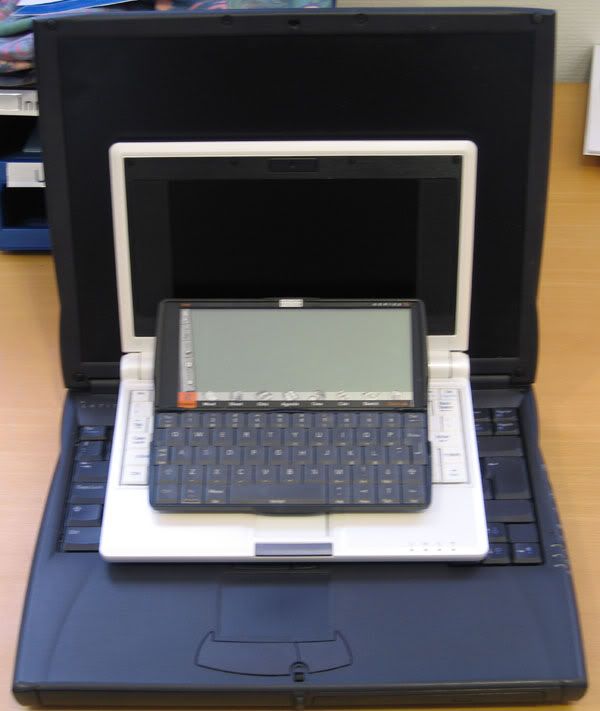
Overall, I'l give the Eee six out of five stars - it works better than I expected, it is smaller than I realised (honestly, untill you have held one in your haand you can't really grasp how tiny it is), and it simply works. And as a bonus, I'm learning about Linux as well. Can life be better?
Subscribe to:
Posts (Atom)